vu-gpsdr: Difference between revisions
mNo edit summary |
mNo edit summary |
||
| (7 intermediate revisions by the same user not shown) | |||
| Line 1: | Line 1: | ||
The | The VU GPSDR is an expansion board designed for the [[Vivid Unit Extender]], transforming your Vivid Unit into a fully integrated, touch-enabled software defined radio (SDR) platform. | ||
<pic src="images/7/7b/VU_GPSDR.jpg" width="80%" align="text" caption=""></pic> | <pic src="images/7/7b/VU_GPSDR.jpg" width="80%" align="text" caption=""></pic> | ||
VU GPSDR integrates GPS-Assisted clocking, an HF upconverter, dual configurable encoders, ADS-B aircraft tracking, and real-time map visualization in a compact form factor. | VU GPSDR integrates GPS-Assisted clocking, an HF upconverter, dual configurable encoders, ADS-B aircraft tracking, and real-time map visualization in a compact form factor. | ||
Combined with the GPSDR++ software (based on SDR++ v1.2.0), the VU GPSDR offers a ready-to-use SDR station with precise timing, wide frequency coverage, and an intuitive interface. The source code of GPSDR++ is [https://github.com/uugear/GPSDRPP available on GitHub]. | Combined with the GPSDR++ software (based on SDR++ v1.2.0), the VU GPSDR offers a ready-to-use SDR station with precise timing, wide frequency coverage, and an intuitive interface. The source code of GPSDR++ is [https://github.com/uugear/GPSDRPP available on GitHub]. | ||
== Usage == | == Usage == | ||
Revision as of 07:06, 12 October 2025
The VU GPSDR is an expansion board designed for the Vivid Unit Extender, transforming your Vivid Unit into a fully integrated, touch-enabled software defined radio (SDR) platform.
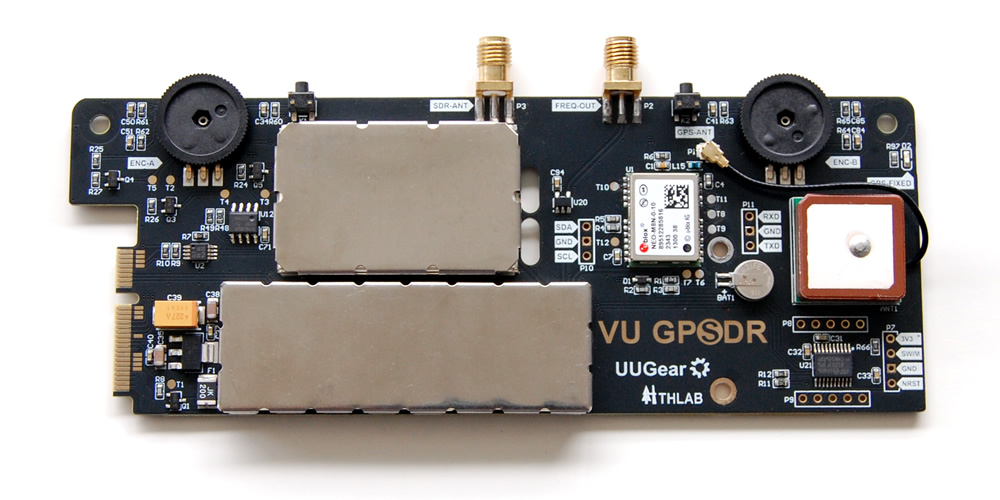
VU GPSDR integrates GPS-Assisted clocking, an HF upconverter, dual configurable encoders, ADS-B aircraft tracking, and real-time map visualization in a compact form factor.
Combined with the GPSDR++ software (based on SDR++ v1.2.0), the VU GPSDR offers a ready-to-use SDR station with precise timing, wide frequency coverage, and an intuitive interface. The source code of GPSDR++ is available on GitHub.
Usage
Start GPSDR++ from the Application menu, or just run "gpsdrpp" in the terminal.
GPSDR++ will start as a full-screen application, and its interface looks like this:
The toolbar at the top contains controls for showing/adjusting SDR parameters (on/off, volume, frequency, tuning mode, SNR etc.). The SDR++ menu is hidden by default — you can tap the button in the upper-left corner to toggle the visibility of the menu and/or sidebar.
The sidebar provides several functional pages, such as Radio, Mode S/ADS-B, GPS, and CLK OUT. You can switch between these pages using the two navigation buttons at the bottom of the sidebar.
The main view contains two tabs — Waterfall and Map — and you can switch between them by tapping on the tab header.
By default, when you are facing the screen:
- The left encoder controls the zoom level of the waterfall view.
- The right encoder controls the tuning frequency.
You can change their functionality by pressing the buttons next to each encoder.
On the radio page, you can turn AGC on/off, adjust the gain, and specify the demodulation mode.
To enable ADS-B reception, go to the Mode S/ADS-B page and tick the checkbox at the top. When aircraft are detected, they will also appear in the Map tab within the main view.
To monitor GPS satellite signal strength, navigate to the GPS page. To show your surrounding geography, activate the Map tab.
To enable the clock signal output, go to the CLK OUT page and tick the checkbox at the top.

